

System Health
Administration → Overview → System Health checks everything Thingport relies on and says, in plain words, what’s wrong and how to fix it. It’s the first place to look when something doesn’t work: an import fails, previews don’t appear, invitations don’t arrive or the AI features stay quiet.
Click Run full test after installing Thingport, after changing its setup, and whenever something seems off. Each part also has its own Test button, and a Settings link to the page where it’s set up. Nothing is tested until you ask, so the results show when each part was last checked.
Ideally, everything is green. Anything marked Required or Recommended that isn’t green means Thingport, or part of it, won’t work properly until it’s fixed. Optional parts can stay unconfigured if you don’t use what they’re for.
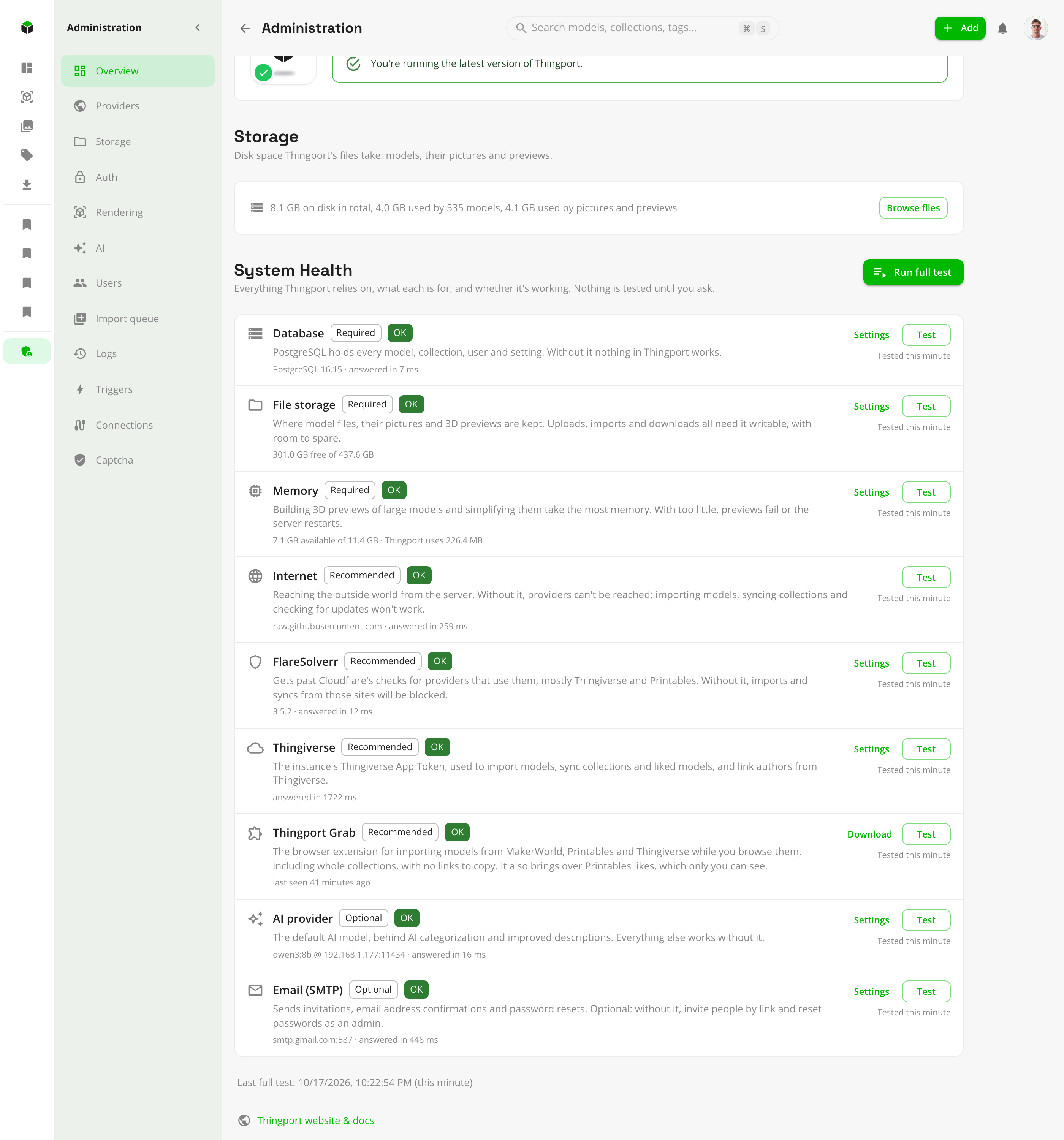
What’s checked
| Part | Needed | What it’s for, and what breaks without it |
|---|---|---|
| Database | Required | Holds every model, collection, user and setting. Without it nothing in Thingport works. |
| File storage | Required | Where model files, pictures and 3D previews are kept. Uploads, imports and downloads fail if it isn’t writable or runs out of space. |
| Memory | Required | Building 3D previews of large models takes the most. With too little, previews fail or the server restarts. |
| FlareSolverr | Recommended | Gets past Cloudflare’s checks, mostly on Thingiverse and Printables. Without it, imports and syncs from those sites are blocked whenever Cloudflare challenges the server. |
| Thingiverse | Recommended | The instance’s Thingiverse App Token, used for every Thingiverse import, synced collection and author lookup. Not checked while Thingiverse is turned off. |
| Thingport Grab | Recommended | The browser extension for importing while you browse MakerWorld, Printables and Thingiverse, whole collections included, and for bringing over Printables likes. Shown as seen once any browser uses it with this instance. |
| AI provider | Optional | The default AI model behind AI categorization and improved descriptions. Everything else works without it. |
| Email (SMTP) | Optional | Sends invitations, email confirmations and password resets. Without it, invitation links are shown to copy instead, and new accounts don’t confirm their address. |
What the colours mean
- OK (green): checked and working.
- Warning (orange): working, but close to trouble, such as storage or memory running low. Fix it before it becomes an error.
- Error (red): not working. For a Required or Recommended part, Thingport or the features that depend on it are broken until it’s fixed.
- Not configured (grey): not set up. Fine for an optional part you don’t use. For FlareSolverr or Thingiverse, imports from those sites will fail sooner or later. Thingport can’t look into anyone’s browser, so Grab stays grey until it’s first used with this instance; get it from the Downloads page.
- Not tested: hasn’t been checked yet. Click Test or Run full test.
Every problem comes with what to do about it, for example: check that the database container is running, make sure
PUID/PGID can write to the storage folder, fix the FlareSolverr URL and port, generate a new Thingiverse token, or
pull the AI model on Ollama.
Common fixes
- File storage not writable: the storage volume isn’t mounted, is read-only, or belongs to another user. Set
PUIDandPGIDin.envto the folder’s owner and rundocker compose up -dagain. - Memory low: give the container more memory, or turn on Simplify previews under Administration → Rendering so heavy models need less.
- FlareSolverr not answering: check that its container is running and that the URL under Administration →
Connections → FlareSolverr is right, port included (usually
http://flaresolverr:8191). - Thingiverse token rejected: generate a new one at thingiverse.com/apps/create and save it under Administration → Providers (see provider setup).
- AI provider not answering or model missing: see troubleshooting the AI features.
- Email not connecting: check the host, port, security setting and login under Administration → Connections → SMTP.