

Providers
Thingport imports from the model sites below. MakerWorld, Printables and Thingiverse are the main ones and have been supported the longest; the rest came later. Each has a page of its own with what it imports, what it needs and how to connect it:
 MakerWorld — your own session cookie; Thingport Grab connects it for you.
 Printables — works out of the box.
 Thingiverse — one App Token, set by an admin.
 MyMiniFactory — one API key, set by an admin; your own sign-in for paid models.
 Snapmaker Space — your own sign-in, which only Thingport Grab keeps alive.
 MakerOnline — its files come only through Thingport Grab.
 Creality Cloud — your own sign-in, for a week at a time.
 NexPrint — your own sign-in, renewed as you use the site.
 Thangs — your own sign-in, which Thingport renews for about a year.
 Cults3D — your own API key, and your browser’s sign-in for files.
 eufyMake — no sign-in to import; yours adds your likes.
 Pinshape — your own sign-in, for the files; collections and likes read without it.
 OwlCAD — no sign-in at all; its CAD projects need Thingport Grab.
 Toymakr3D — your own sign-in, for the files and your likes; its models read without one.
 Makerables — no sign-in to import; yours adds your saved projects.
 CGTrader — your own sign-in, for the files, your likes and your wishlist; Grab or FlareSolverr for its bot check.
 GrabCAD — your own sign-in, for the files; anyone’s likes read without it.
 Meshy — your own sign-in; community models also need a Meshy Pro or Studio plan.
 PIXUP — your own sign-in, for the files of the models you own; anyone’s wishlist and collections read without it.
 Fab365 — your own sign-in, for the files and your favourites; its models read without one.
 3DExport — your own sign-in, for the files and your own collections; anyone’s public collections read without it.
 QIDI Maker — no sign-in to import; yours adds your own collections and likes.
 VoxelShare — no sign-in to import; yours adds your own collections and likes.
Inside Thingport, About in a provider’s menu under Configuration → Providers, or a click on a model’s provider badge, shows the same in short.
At a glance
Section titled “At a glance”| Provider | Sign-in | Thingport Grab | FlareSolverr | Collections | Likes | Sync | Print profiles |
|---|---|---|---|---|---|---|---|
| MakerWorld | Your cookie | Recommended | Optional | ✓ | ✓ | ✓ | |
| Printables | None | Optional¹ | Recommended | ✓ | ✓¹ | ✓ | |
| Thingiverse | Admin’s App Token | Optional | Recommended | ✓ | ✓ | ✓ | |
| MyMiniFactory | Admin’s API key, yours for paid | Optional | Recommended | ✓ | ✓ | ||
| Snapmaker Space | Yours, for a day | Recommended² | Bookmarks | ✓ | ✓ | ✓ | |
| MakerOnline | Yours, for likes only | Required | ✓ | ✓ | ✓ | ✓ | |
| Creality Cloud | Yours, for a week | Recommended | ✓ | ✓ | ✓ | ✓ | |
| NexPrint | Yours | Recommended | ✓ | ✓ | ✓ | ||
| Thangs | Yours, renewed for a year | Recommended | Optional | ✓ | ✓ | ✓ | |
| Cults3D | Your API key + browser sign-in | Recommended³ | Printlists | ✓ | ✓ | ||
| eufyMake | Yours, for likes only | Recommended | ✓ | ✓ | ✓ | ||
| Pinshape | Yours, for the files | Recommended | ✓ | ✓ | ✓ | ||
| OwlCAD | None | Recommended⁴ | |||||
| Toymakr3D | Yours, for the files | Recommended | ✓⁵ | ✓ | |||
| Makerables | Yours, for saved projects only | Recommended | Saved | ✓ | |||
| CGTrader | Yours, for the files | Recommended⁶ | Recommended | Wishlist | ✓⁶ | ✓ | |
| GrabCAD | Yours, for the files | Recommended | ✓ | ✓ | |||
| Meshy | Yours; Pro for community models | Recommended | ✓ | ✓ | |||
| PIXUP | Yours, for the files | Recommended | Collections, wishlists | ✓ | ✓ | ||
| Fab365 | Yours, for the files | Recommended | ✓⁷ | ✓ | |||
| 3DExport | Yours, for the files | Recommended | Bookmark collections | ✓ | |||
| QIDI Maker | Yours, for your collections and likes | Recommended | ✓ | ✓ | ✓ | ✓ | |
| VoxelShare | Yours, for your collections and likes | Recommended | ✓ | ✓ | ✓ | ✓ |
- Your private Printables collections and your likes are read by Grab, while you’re on Printables.
- Snapmaker’s sign-in lasts a day and only Grab renews it; without Grab you paste a new one every day.
- Cults3D’s files need your browser’s Cloudflare clearance, and Thingport on the same IP address as that browser.
- A gallery item that is a CAD project, rather than a library part, has no stored mesh: OwlCAD’s editor builds its file, so Thingport Grab exports it on owlcad.com.
- Toymakr3D hands a model’s files to signed-in users only, the free ones included, and shows your likes to you alone.
- CGTrader shows your likes and wishlist to you alone, and its downloads sit behind AWS’s bot check, which Thingport passes with Grab’s token from your browser or FlareSolverr’s own.
- Fab365 hands a model’s files to signed-in members only, the free ones included, and shows your favourites to you alone.
Sign-in is what Thingport needs before it can import; “yours” means each user connects their own account.
Dependencies
Section titled “Dependencies”Thingport Grab
Section titled “Thingport Grab”Thingport Grab is Thingport’s browser extension for Chrome, Edge and Firefox. Besides
importing straight from a model’s page, it hands your browser’s sign-in to Thingport, so the sites that need one connect
by just being visited, and stay connected. On MakerOnline it does the downloading itself, so there it’s required, and
on OwlCAD it exports CAD projects from OwlCAD’s own editor. Install it from the Downloads page and connect it with
Pair with Thingport in its popup: that opens your Thingport instance in a tab, where you approve that browser, so no
password is kept in Grab (see its setup). Sites after MakerWorld, Printables and
Thingiverse need one click first, on the site in Grab’s popup (a + marks one that’s off) or on Enable all.
If a reverse proxy upgrades your instance’s http:// address to https:// on the same host, Grab follows that
upgrade. It never sends your sign-in along any other redirect: then enter the final address in Grab instead. Grab spots
the upgrade with a GET request, so a proxy that redirects only other methods, such as POST, needs the final address too.
A connection made before this upgrade was followed may need connecting once more, so Grab may reach the https://
address.
FlareSolverr
Section titled “FlareSolverr”FlareSolverr uses a real browser to solve Cloudflare challenges. It’s part of the standard Docker Compose stack. Set its global URL under Administration → Connections → FlareSolverr to enable fallback for all declared provider routes. System Health checks the service. Clearing the URL disables all fallbacks, including when a previous request warmed the proxy cache. CGTrader’s downloads sit behind AWS’s bot check instead: FlareSolverr gets Thingport a token for it whenever the last one is turned down, and without FlareSolverr only the token Grab sends from your browser will do.
Prefer HTTPS for a solver on another machine: provider cookies and API tokens travel to it. Plain HTTP keeps
working, and System Health shows a warning for it. Once the URL is HTTPS, or one of the local endpoints
flaresolverr (the Compose service), localhost, 127.0.0.1 or [::1], set FLARESOLVERR_REQUIRE_HTTPS=true to
refuse plaintext remote solvers from then on, saved and environment URLs included.
Thingport doesn’t follow a redirect from the solver’s address, since credentials would go along. A reverse proxy in
front of the solver has to answer /v1 itself: one that redirects it, even just to /v1/, needs changing, because
until then the URL can’t be saved and solver requests fail.
Thingiverse and MyMiniFactory API requests first use guarded direct transport with a Chrome-like TLS handshake.
Only a 429 or Cloudflare challenge retries through the enabled solver, including the Thingiverse access_token or
MyMiniFactory key in the URL. A 401 rejects the credential, and so does a JSON 403 from Thingiverse. MyMiniFactory
also answers 403 for models that aren’t public, so there it only means the model can’t be reached. MakerWorld,
Printables and Thangs support selected page/API fallbacks; Cults3D supports public pages only. Binary downloads,
authenticated Cults3D calls and MakerWorld’s separate Bambu cloud API do not support solver fallback.
Use a private, isolated solver. It receives provider cookies and URL API tokens, and its logs may record them. Thingport checks the initial HTTPS host, path and query against each provider’s declarations, but the solver’s browser navigation, redirects and third-party requests are outside Thingport’s per-hop destination guard. Isolate its network access from private services and restrict access to the solver and its logs.
Connecting a provider
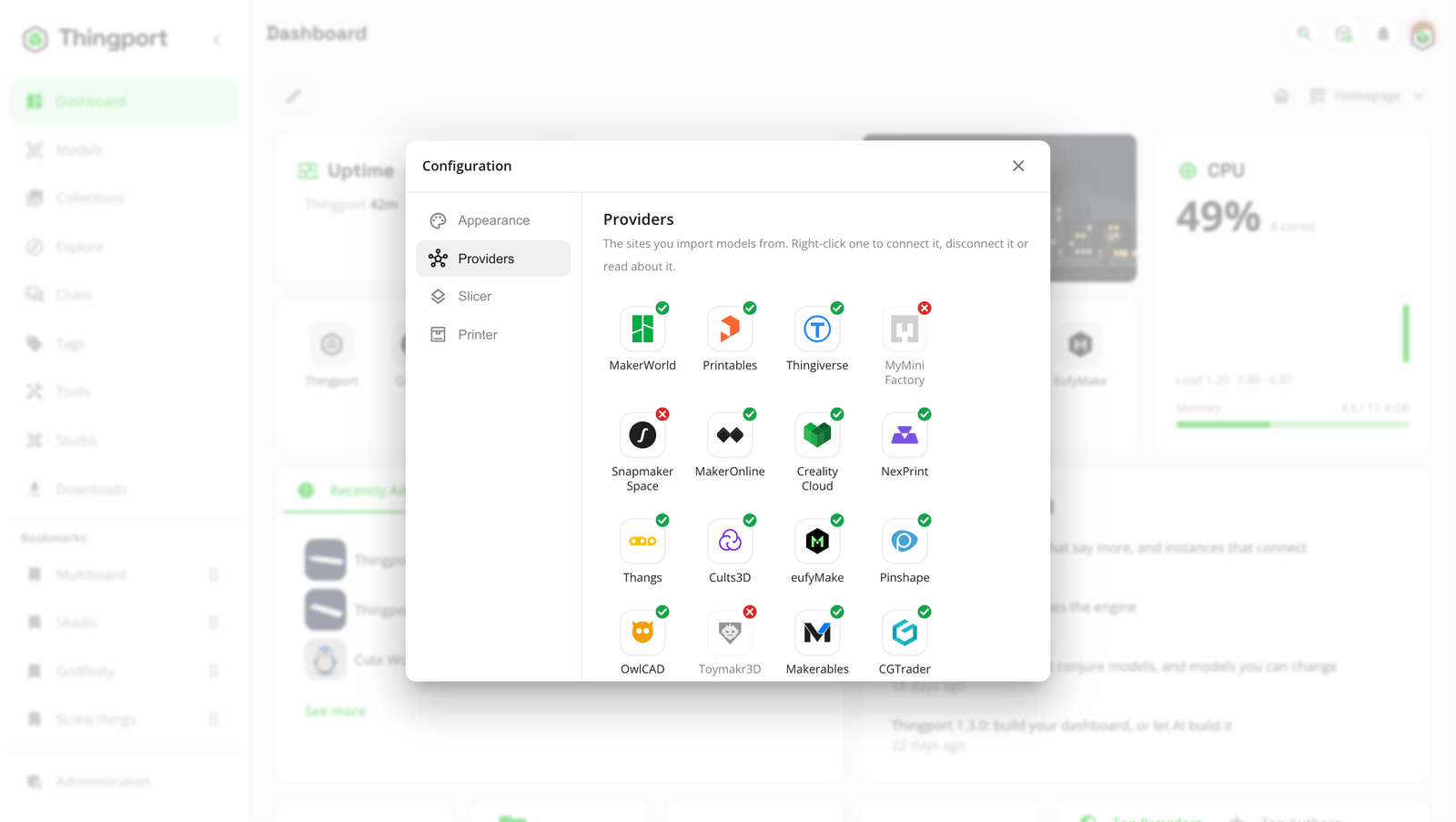
Section titled “Connecting a provider”Connect them under Configuration → Providers: open the user menu (your avatar, top right) and choose Configuration, or click one of the provider chips at the bottom of that menu. Right-click a provider to connect or disconnect it, or double-click one that isn’t connected yet. A green tick means it’s connected; a red cross, that it isn’t or not fully, and hovering it says why. A provider your admin has turned off isn’t listed.

Turning a provider off
Section titled “Turning a provider off”Admins choose which providers this Thingport instance imports from, under Administration → Providers. All are on by default. Turn one off and nothing new comes from it for anyone: links to it, Thingport Grab and the import queue are refused, its synced collections pause, and background jobs skip it. It also disappears from everyone’s Configuration → Providers. Models already imported from it stay as they are, and turning it back on picks up where it left off. To switch several at once, choose the select button, pick them, and turn them on or off together; the filter button narrows the list by whether they’re on, what they import, who signs in and what they need. The Thingiverse App Token and the MyMiniFactory API key are set on the same page.
Feedback
Section titled “Feedback”Something unclear, wrong or missing on this page? Say so here, or react. It’s kept in GitHub Discussions. Something broken? Report it as a bug.